— amazon · Home Office
Best Standing Desks for Small Spaces: Smart Buying Guide
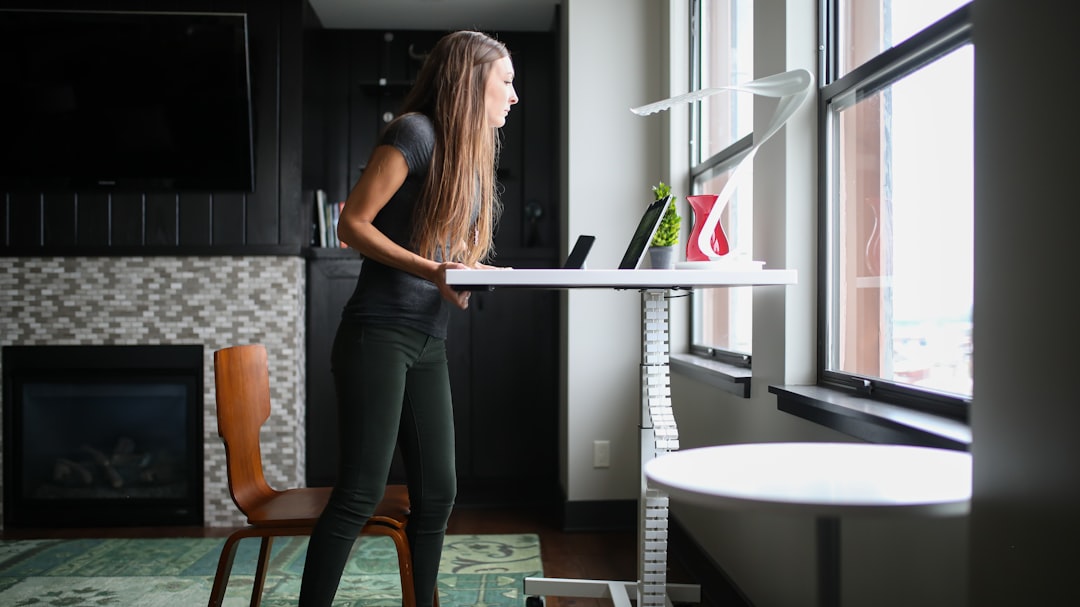
Discover the best standing desks for small spaces, with sizing tips, smart features, and compact Amazon picks for a healthier, more productive home office.
A cramped home office does not have to mean a cramped workday. The best standing desks for small spaces make it possible to change positions, improve your setup, and protect valuable floor area at the same time. Whether you work from a bedroom corner, a studio apartment, a shared dining room, or a narrow alcove, the right desk can create a more comfortable place to focus. Compact models now come with electric lift systems, folding tops, wheels, storage shelves, and slim frames designed for tight layouts. The challenge is choosing a desk that fits your room without sacrificing stability, usable desktop space, or ergonomic adjustment. This guide explains what to measure, which features matter most, and how to compare compact options on Amazon. Use it to find a small standing desk that supports your monitor, laptop, and daily workflow while keeping your home office organized and easy to live in.
Why Standing Desks Work So Well in Small Home Offices
Standing desks are especially useful in compact rooms because they can make one work zone serve several purposes. Raising the surface lets you change posture during long computer sessions, while a slim desk footprint prevents your workstation from overwhelming the room. For renters and apartment dwellers, a compact standing desk can be easier to move, reposition, or store than a large executive-style desk.
The biggest benefit is flexibility. A desk placed beside a bed, sofa, or kitchen table can function as a seated workstation in the morning and a standing station later in the day. Some models also roll away when guests arrive. Standing is not a replacement for sitting all day; the practical goal is regular movement and comfortable alternation between both positions.
Before purchasing, consider the complete workstation rather than the desktop alone. Your monitor arm, keyboard, chair clearance, cable routing, and power outlet location all affect whether a desk will feel efficient in a small room. A thoughtfully sized desk often feels more useful than a larger model with unused surface area.
Measure Before You Buy: The Small-Space Desk Checklist
Start by measuring the available width, depth, and vertical clearance. For many small offices, a desk between 32 and 48 inches wide is enough for a laptop, keyboard, mouse, and one monitor. A 20- to 24-inch-deep top is usually more practical than a very shallow surface, especially if you use a full-size keyboard. Keep at least a few inches between the desk and nearby doors, drawers, radiators, or walking paths.
Next, check the desk height range. A good sit-stand desk should lower enough for comfortable seated typing and rise high enough for your elbows to rest near a 90-degree angle while standing. Taller users should pay close attention to the maximum height, while shorter users should verify the minimum height. If you plan to add a treadmill pad or walking pad, factor its height into your standing measurement.
Also review the stated weight capacity. Add the weight of monitors, monitor arms, laptop docks, speakers, and accessories instead of estimating from the computer alone. Finally, compare the base dimensions with the top dimensions. A narrow desktop is helpful, but wide feet may still block a doorway or extend into the room.
- Measure wall-to-wall space and door swing.
- Allow room for chair movement when seated.
- Confirm minimum and maximum desk height.
- Check the total equipment weight.
- Plan where cables and power strips will go.
Best Types of Standing Desks for Small Spaces
compact electric desk: An electric model is a strong choice for daily sit-stand use because height changes are quick and consistent. Look for a narrow single-motor frame, memory presets, anti-collision protection, and a desktop around 40 to 48 inches wide. This category is ideal for a dedicated office nook where you want the convenience of one-button adjustments. If a model fits your measurements, you can check the price and confirm current Amazon specifications before ordering.
manual standing desk: Hand-crank desks cost less and do not require a nearby outlet for lifting. They are often a smart option for occasional standing or light equipment, although frequent adjustments take more effort. A manual standing desk can be a sensible fit for a spare room, student workspace, or temporary remote-work setup.
wall-mounted standing desk: A folding, wall-mounted standing desk is one of the most space-efficient solutions available. It can create a work surface where a freestanding desk would be impossible. Confirm the wall material, mounting hardware, folded depth, and safe weight rating before installation. This style works best with a laptop or lightweight monitor setup.
Mobile standing desk: A rolling desk is useful when your workstation must move between rooms. Locking casters are essential, and a lower shelf can hold a desktop computer or printer. Choose a stable frame rather than the lightest possible option if you plan to type while standing.
Features That Matter Most on a Compact Standing Desk
In a tight layout, every feature should earn its space. Electric height adjustment is convenient, but stability should come first. Read recent buyer feedback for comments about wobble at standing height, particularly when the desk holds an ultrawide monitor or monitor arm. A crossbar can improve rigidity on some frames, though it may reduce legroom for taller users.
Memory presets are valuable for shared workspaces because they return the desk to comfortable seated and standing positions without repeated adjustment. Anti-collision technology can help protect drawers, chairs, and nearby furniture when the desk moves. For cable-heavy setups, look for grommets, a cable tray, or enough under-desk clearance to attach one.
Desktop material affects daily use as well. Laminated engineered wood is common, affordable, and easy to clean. Solid wood tops can look more premium but may be heavier and require more care. A split-top design may arrive in a smaller package, which helps with apartment deliveries, but make sure the center seam will not interfere with a monitor mount.
Storage is helpful only when it does not compromise movement. A shallow drawer, headphone hook, or side bag can keep essentials close without turning the desktop into clutter. For most compact offices, prioritize a clean surface, a stable base, and enough depth for comfortable keyboard placement.
How to Set Up a Small Standing Desk Ergonomically
Even the best small standing desk needs an ergonomic setup. Position the keyboard so your shoulders stay relaxed and your elbows remain close to your body. The top of the monitor should generally sit around eye level; a monitor arm is especially helpful in small spaces because it frees desktop depth and lets you fine-tune screen placement. If you use a laptop as your main computer, pair it with an external keyboard and mouse when possible.
Keep the desk against a wall or in a corner only if the frame can still travel freely. Leave enough clearance for the desktop and monitor to rise without striking shelves, artwork, or window ledges. Use a slim surge protector mounted beneath the top, plus reusable cable ties, to avoid loose cords near your feet.
When standing, wear supportive footwear or use a compact anti-fatigue mat. Begin with short standing intervals, such as 20 to 30 minutes, then alternate throughout the day. Avoid locking your knees or trying to stand continuously for hours. The most sustainable workspace encourages frequent position changes, small walking breaks, and a setup you can maintain every day.
Affiliate disclosure: As an Amazon Associate, this site may earn from qualifying purchases. Product prices, availability, dimensions, and features can change, so review the current Amazon listing before buying.
FAQ
- What size standing desk is best for a small room?
- For most compact home offices, a desk 32 to 48 inches wide and 20 to 24 inches deep offers a useful balance of workspace and floor space. A laptop-only setup can use less width, while a monitor, keyboard, and docking station may require closer to 40 inches or more.
- Are electric standing desks worth it for small spaces?
- An electric standing desk is worth considering if you expect to change height often. Push-button adjustment makes it easier to alternate between sitting and standing, while memory presets are useful in a shared workstation. For occasional use or tighter budgets, a manual standing desk can still work well.
- Can I put a standing desk in a bedroom?
- Yes. Choose a compact electric desk or narrow manual model that leaves enough walking space around the bed and door. Measure the desktop at its highest position, including monitor height, to ensure it will not hit shelves, windows, or wall decor.
- What should I look for in a wall-mounted standing desk?
- Check the supported weight, folded depth, mounting requirements, and desktop size. A wall-mounted standing desk is best for lightweight equipment such as a laptop, compact keyboard, and small monitor. Ensure it is installed into suitable wall structure using the manufacturer's instructions.
Conclusion
The best standing desks for small spaces do more than rise and lower: they help a limited room work harder without creating visual or physical clutter. Start with accurate measurements, then choose the desk type that matches your routine. A compact electric desk is often the easiest option for frequent height changes, while a manual standing desk can provide strong value for lighter or occasional use. If floor space is extremely limited, a wall-mounted standing desk or rolling model may be the better answer. Prioritize a stable frame, a comfortable height range, enough desktop depth, and a realistic weight capacity for your equipment. Once you have narrowed your choices, review current dimensions, ratings, delivery details, and available finishes on Amazon. Take a moment to check the price, compare features, and choose a desk that makes your home office more flexible, healthier, and easier to use every day.
— Enjoyed this? Pass it on
— Want to build your own?
Publish articles like this in 90 seconds.
The whole terminal — AI writer, PA-API sync, refresh radar, auto-tweets — free for the first 3 articles.
Try for free