— amazon · Home Office
Best Ergonomic Office Chairs for Comfortable Home Work
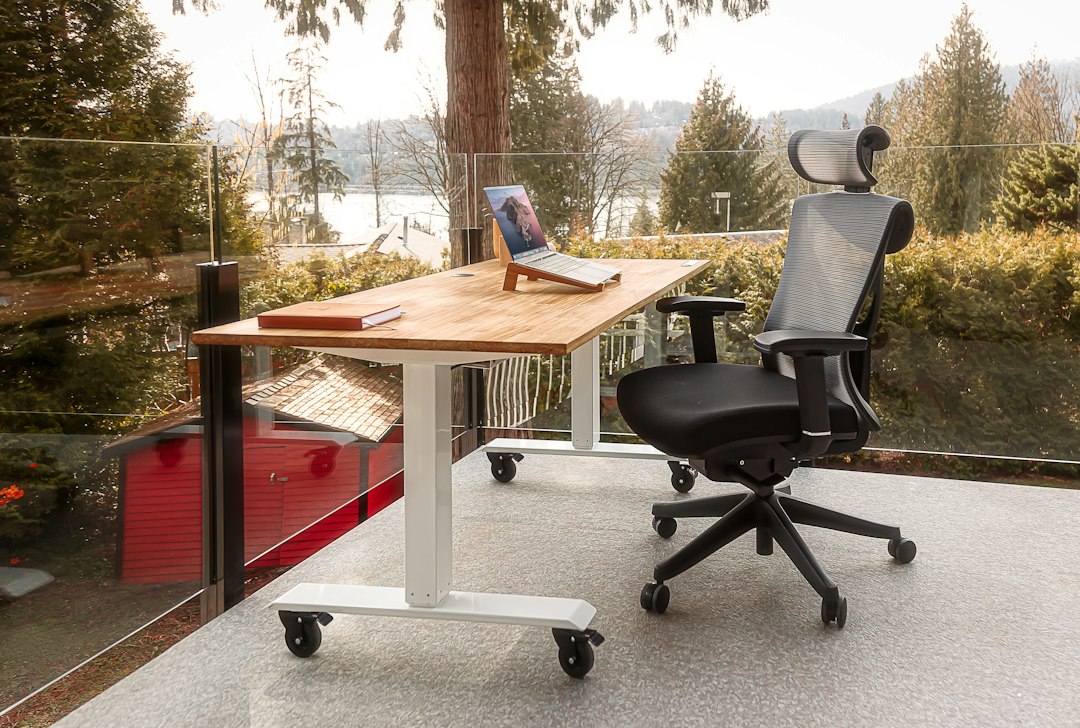
Find the best ergonomic office chairs for posture, comfort, and all-day focus. Compare features, fit tips, and Amazon-ready buying advice for your home office.
A great home office chair does more than look professional: it supports your spine, keeps pressure off your hips, and helps you stay productive when a quick task turns into a long day. The best ergonomic office chairs are not simply the softest or most expensive models. They are adjustable enough to match your body, desk height, work habits, and room. Whether you answer calls, edit video, study, or manage a business from home, the right seat can reduce distracting discomfort and encourage healthier movement. This guide explains which adjustments matter, how to measure fit before ordering online, and what to expect from popular chair styles sold through Amazon. You will also find practical recommendations for different budgets and body types, plus an easy comparison checklist. Use the advice below to choose with confidence rather than relying on star ratings alone. Your back, shoulders, and concentration will notice the difference.
What Makes an Office Chair Truly Ergonomic?
An ergonomic desk chair should adapt to you rather than forcing you into one fixed position. Start with seat-height adjustment: when your feet rest flat on the floor, your knees should sit near a 90-degree angle and your thighs should feel supported without pressure behind the knees. If your desk is high, use a footrest instead of raising the chair so far that your feet dangle.
Next, prioritize adjustable lumbar support. The lumbar curve should meet the small of your back, not the middle of it, and ideally it should move up, down, or in and out. A supportive backrest encourages a neutral spine, but it should not feel like a hard object pushing into your back. Adjustable recline tension and a tilt lock are also valuable because changing posture throughout the day can be more comfortable than sitting perfectly still.
Armrests matter more than many buyers expect. Look for height adjustment at minimum; width, depth, and pivot adjustment are useful when you type, use a mouse, or switch between tasks. Set armrests so your shoulders stay relaxed and elbows remain close to your body. Finally, choose a seat depth that leaves roughly two to three fingers of space between the seat edge and the back of your knees. These fit details separate the best ergonomic office chairs from attractive but poorly supportive alternatives.
Best Ergonomic Office Chairs for Different Home Office Needs
Steelcase Series 2 is a strong premium choice for people who want extensive adjustment and a refined professional feel. Its flexible back design, adjustable arms, and configurable options can suit demanding full-time desk work. Because specifications and included features can vary by seller and configuration, review the listing carefully before you check the price. It is especially worth considering if multiple people use the same workstation and need a chair with a broad adjustment range.
Herman Miller Aeron remains a recognizable high-end option for buyers who prefer a breathable mesh office chair and long-term support. It is offered in multiple sizes, so choosing the appropriate size is essential rather than optional. Its ventilated design may be appealing in warm rooms, while its premium cost makes it better suited to buyers who spend many hours seated and value fit, warranty coverage, and build quality. Confirm the specific size, condition, and seller details on Amazon before ordering.
For a more budget-conscious ergonomic home office chair, the SIHOO M57 is commonly considered by shoppers seeking a mesh back, headrest, and several adjustable components without entering luxury-chair pricing. It can be a practical starting point for remote workers who need better support than a basic task chair. Check the listed weight capacity, armrest movement, headrest range, and return policy, since versions may differ.
If you are tall, pay special attention to backrest height, seat-depth range, and headrest placement. If you are petite, prioritize a shallower seat pan and low minimum seat height. Larger users should seek a clearly stated weight rating, stable five-point base, generously sized seat, and suitable dimensions. A chair that is excellent for one reviewer can be uncomfortable for another simply because their proportions differ.
Disclosure: As an Amazon Associate, this site may earn from qualifying purchases. This does not change the price you pay and helps support our content.
How to Measure Your Desk Setup Before Buying
Measure before you shop. First, note the height from your floor to the top of your desk or keyboard tray. Most desks work best when your elbows can rest at about 90 degrees while your shoulders remain down. Compare that number with each chair's seat-height range, remembering that cushion compression may slightly lower your final sitting position.
Measure the width and depth available under your desk as well. Wide armrests may prevent a chair from rolling close enough to the keyboard, causing you to lean forward. If space is limited, consider flip-up arms or arms that can slide beneath the desk. Check your floor type too: standard hard casters roll easily on carpet but may scratch hard flooring, while soft rubber-style casters are often more floor-friendly.
For seat depth, sit on a stable chair and measure from your back to the inside of your knee. A seat that is too deep can press behind your knees or force you to perch forward, which defeats the purpose of back support. Also measure your available clearance if you plan to use a headrest, especially near shelving or a wall. A few minutes of measuring can prevent an inconvenient return.
Mesh, Foam, Leather, or Fabric: Choose the Right Material
Mesh chairs are popular for home offices because air moves through the backrest, helping you stay cooler during long work sessions. Quality mesh should feel supportive and resilient, not loose or scratchy. Some people love its firmer, springy feel, while others prefer the pressure distribution of a padded seat.
Foam-cushioned fabric chairs often feel warmer and softer at first contact. Look for dense foam and durable upholstery rather than judging comfort by thickness alone. Very soft, low-density padding can flatten over time and may provide less stable support. Fabric can also add visual warmth to a living-room office, but it may require more frequent cleaning.
Leather and faux-leather chairs can suit a formal workspace, yet they may retain heat and can be less breathable than mesh or fabric. Whatever material you choose, prioritize a stable frame, smooth adjustments, and a backrest shape that fits your body. The best office chair for back pain is not defined by upholstery; it is the chair you can adjust correctly and use comfortably every day.
Set Up Your Chair for Better All-Day Comfort
Even an excellent chair needs correct setup. Begin by adjusting seat height until your feet are supported. Slide your hips fully to the back of the seat, then position the lumbar support against your natural lower-back curve. Adjust seat depth so you can sit back without the front edge digging into your legs.
Set armrests just high enough to support your forearms without lifting your shoulders. If armrests collide with your desk, lower them or move them out of the way rather than hunching. Recline tension should allow you to lean back with light effort while still feeling supported. A slight recline can reduce the feeling of compression that comes with upright sitting.
Your chair is only one part of the workstation. Place the top of your monitor around eye level, keep the screen roughly an arm's length away, and position your keyboard so wrists stay neutral. Stand, stretch, or walk briefly every 30 to 60 minutes. Movement complements ergonomic support and can make any well-fitted chair feel better over a full workday.
FAQ
- Are expensive ergonomic office chairs worth it?
- They can be worthwhile for people who work at a desk for many hours and need durable materials, dependable adjustments, and stronger warranty coverage. However, a mid-range chair that fits your body and offers seat-height, armrest, recline, and lumbar adjustments may be a better purchase than an expensive chair in the wrong size. Focus on fit and return terms first.
- Is a headrest necessary on an office chair?
- A headrest is optional for most typing and computer tasks. It becomes more useful if you frequently recline, take calls while leaning back, or experience neck fatigue. The best headrests adjust in height and angle, allowing them to support the neck without pushing the head forward.
- What is the best ergonomic office chair for back pain?
- There is no single best office chair for back pain because pain causes and body shapes vary. Look for adjustable lumbar support, suitable seat depth, stable recline, and a height range that lets your feet rest flat. If pain is persistent, severe, or worsening, seek guidance from a qualified healthcare professional.
- Should I buy a mesh office chair for my home office?
- A mesh office chair is a good choice if you run warm or want a breathable backrest. Make sure the mesh feels supportive and that the chair still includes the adjustments you need. Buyers who prefer a softer feel may favor a mesh back paired with a padded foam seat.
Conclusion
Choosing among the best ergonomic office chairs is ultimately about matching adjustability to your body and daily routine. Start with the non-negotiables: an appropriate seat-height range, comfortable seat depth, supportive lumbar positioning, and armrests that allow relaxed shoulders. Then compare materials, recline features, room dimensions, and the chair's stated capacity. Premium models such as the Steelcase Series 2 or Herman Miller Aeron can make sense for intensive work, while options such as the SIHOO M57 may offer useful ergonomic features for a more modest budget. Before purchasing, review the current Amazon listing for exact configuration, seller reputation, delivery details, and return eligibility. Do not rush based on a temporary promotion or a single review. Measure your workspace, compare your shortlist, and check the price on the chair that best fits your needs. A properly adjusted chair is an investment in a more comfortable, focused home office.
— Enjoyed this? Pass it on
— Want to build your own?
Publish articles like this in 90 seconds.
The whole terminal — AI writer, PA-API sync, refresh radar, auto-tweets — free for the first 3 articles.
Try for free