— amazon · Home Office
Best Adjustable Laptop Stands for a Better Home Office
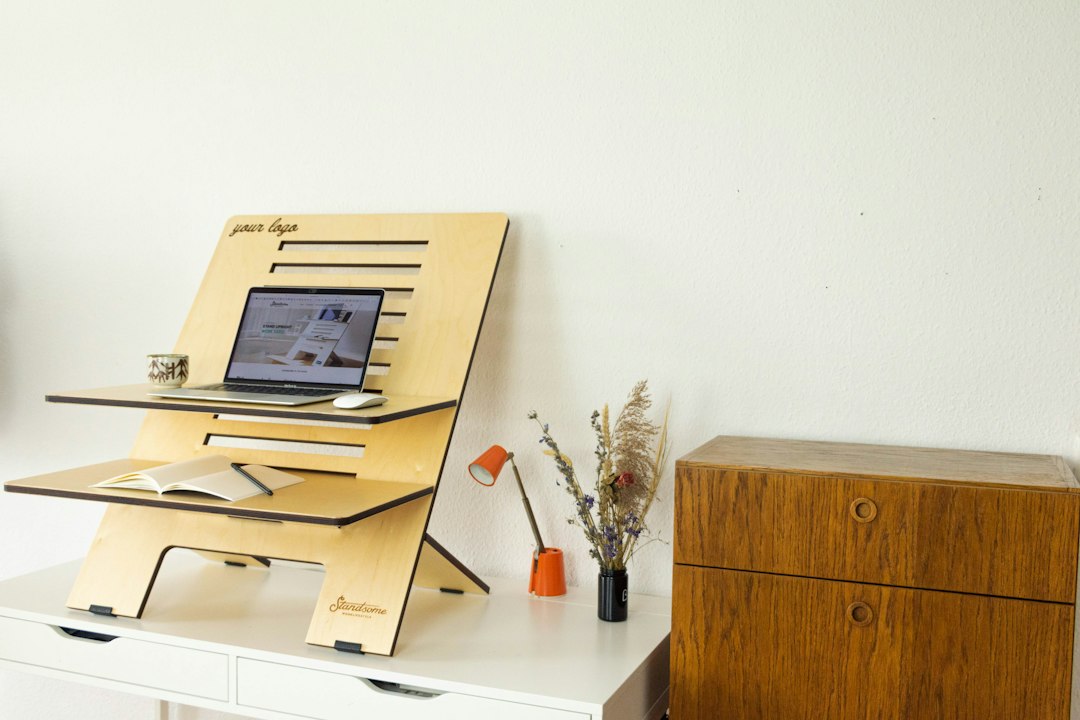
Discover the best adjustable laptop stands for a healthier, more organized home office. Compare features, ergonomics, and buying tips before you shop today.
An uncomfortable laptop setup can quietly undermine an otherwise productive workday. Looking down at a screen for hours often leads to neck tension, rounded shoulders, overheating, and a cluttered desk that makes it harder to focus. Adjustable laptop stands offer a simple, affordable upgrade for home office workers, students, remote professionals, and anyone who spends long stretches at a computer. By raising your screen closer to eye level, these stands can support better posture while creating useful space beneath your laptop for a keyboard, notebook, or accessories. The right model depends on your laptop size, desk depth, work style, and whether you need portability or maximum stability. In this guide, you will learn what separates great adjustable laptop stands from flimsy alternatives, which features matter most, and how to choose a stand that makes your daily setup more comfortable and efficient.
Why Adjustable Laptop Stands Matter for Home Office Ergonomics
For many remote workers, a laptop is the center of the home office. Unfortunately, laptop screens typically sit well below a comfortable viewing height when placed directly on a desk. That position encourages users to bend their necks forward, especially during video calls, writing sessions, and spreadsheet work. An adjustable laptop stand raises and angles the display so you can position it more naturally.
The goal is not to create a perfect workstation with one accessory alone. Instead, adjustable laptop stands help you build a more ergonomic setup when paired with an external keyboard and mouse. Ideally, the top third of your screen should be near eye level, while your elbows stay close to a 90-degree angle. This arrangement can reduce unnecessary strain and make it easier to maintain a neutral seated posture throughout the day.
A stand also improves airflow around the bottom of your computer. Laptops can become warm during demanding tasks, and an open-frame design helps heat escape more efficiently than a flat desk surface. For small home offices, the added space underneath the device is another practical advantage. You can slide your keyboard away after work or keep frequently used items within reach without sacrificing desktop real estate.
Key Features to Look for Before You Buy
Not all adjustable laptop stands offer the same level of comfort, durability, or flexibility. Start by checking the height and tilt range. A basic desktop riser may offer several fixed levels, while a fully adjustable model uses a hinged arm or telescoping design to provide more precise positioning. If you alternate between sitting and standing, a wider height range is especially useful.
Material matters as well. An aluminum laptop stand is often a strong choice because it is lightweight, sturdy, and helps dissipate heat. Steel models can be exceptionally stable but may weigh more, while plastic stands are usually budget-friendly and easy to carry. Look for silicone pads on the top surface and feet; these prevent scratches and keep both the stand and laptop from sliding.
Next, confirm compatibility. Most stands list a supported laptop range, commonly between 10 and 17 inches. A larger laptop needs a broad platform, reinforced hinges, and a sturdy base. Check the manufacturer’s stated weight capacity rather than assuming any stand can safely support a gaming laptop or large workstation model.
Finally, consider how you actually work. A foldable portable laptop riser is ideal if you move between rooms, coworking spaces, and coffee shops. For a permanent desk, prioritize stability, adjustability, and a design that leaves enough room for an external keyboard and mouse.
Types of Adjustable Laptop Stands Compared
There are several popular styles of adjustable laptop stands, and each suits a different home office routine. Foldable metal stands are among the most versatile. They collapse flat for travel, usually offer multiple height settings, and work well for everyday typing when combined with an external keyboard. Their main limitation is that very lightweight models can wobble at higher positions.
Ventilated fixed risers are another common option. These stands lift a laptop to one predetermined height and often feature an open aluminum frame. They are simple, clean-looking, and highly stable, but they do not provide the flexibility of a true adjustable design. They are best for users who know exactly where they want their screen positioned.
Hinged Z-style stands provide a broad range of height and angle adjustments. They can bring a laptop significantly closer to eye level, making them useful for video calls and standing desk arrangements. However, choose carefully: a quality hinge is essential for preventing gradual drooping or instability under heavier devices.
Finally, lap desks and couch stands can help when your workspace changes daily. While convenient, they usually offer less precise screen placement than a dedicated laptop stand for desk. For regular eight-hour workdays, a stable desktop model remains the better long-term investment.
How to Set Up Your Laptop Stand Correctly
Even the best stand will not solve discomfort if it is positioned poorly. Begin by placing your laptop on the stand and adjusting the screen until the top third is near eye level. You should be able to look at the display without noticeably bending your neck down. If the stand cannot raise the screen high enough, place it on a stable, non-slip platform rather than stacking unstable books.
Once the laptop is elevated, avoid typing directly on its built-in keyboard for extended periods. Raising the computer also raises the keyboard, which can cause wrist and shoulder strain. Add an external keyboard and mouse so your forearms can rest approximately parallel to the floor. This is the most important step for turning an adjustable laptop stand into a practical ergonomic workstation.
Keep your monitor distance comfortable, generally about an arm’s length away, and reduce glare by positioning the screen perpendicular to windows when possible. If you use a webcam frequently, an elevated screen can also improve your camera angle and create a more professional appearance on calls.
Before committing to a model, read current customer feedback and check the price for options that match your laptop size and preferred adjustment range. Small differences in hinge quality, base width, and padding can have a major impact on everyday usability.
Choosing the Best Laptop Stand for Your Work Style
The best choice comes down to where and how you work. If you have a dedicated desk and a larger laptop, choose a heavy-duty adjustable model with a wide base, a high weight rating, and reliable hinge resistance. These features are more valuable than extreme portability when the stand will stay in one place.
For hybrid workers, a compact foldable stand is often the smarter option. Look for a model that folds into a slim shape, includes a carry pouch if needed, and can be adjusted quickly without tools. A lightweight stand should still have non-slip feet and enough surface support to prevent your laptop from flexing or shifting.
Budget buyers should focus on build quality rather than unnecessary extras. Strong aluminum construction, secure rubber pads, and several usable height settings will typically deliver more value than built-in phone holders or decorative finishes. If you use a thick laptop case, measure the device before ordering and verify that the front support lip will hold it securely.
Amazon offers a broad selection of adjustable laptop stands across price points, so compare specifications, recent reviews, and return policies before purchasing. A well-chosen stand can serve for years and is one of the easiest upgrades you can make to a more comfortable, organized home office.
FAQ
- Are adjustable laptop stands good for posture?
- Yes. Adjustable laptop stands can improve posture by raising the screen closer to eye level, helping reduce the tendency to bend your neck downward. For best results, use the stand with an external keyboard and mouse so your wrists and shoulders remain in a comfortable position.
- What height should an adjustable laptop stand be?
- The ideal height places the top third of your laptop screen near eye level. Your exact setting depends on your chair, desk height, body proportions, and whether you are sitting or standing. Choose a stand with enough adjustment range for your normal work position.
- Can an aluminum laptop stand hold a heavy laptop?
- Many aluminum laptop stand models can safely support larger laptops, but you should always check the listed weight capacity and supported screen size. For heavy gaming laptops or 17-inch devices, select a model with a broad base, reinforced frame, and strong hinges.
- Is a portable laptop riser stable enough for daily work?
- A quality portable laptop riser can be stable enough for daily use, especially when used on a flat desk with an external keyboard. Lightweight travel stands may have more movement at taller settings, so choose a model with non-slip pads and solid locking points.
Conclusion
Adjustable laptop stands are a practical home office upgrade because they support better screen placement, improve desk organization, and can help make long work sessions more comfortable. The best option is not necessarily the most expensive one; it is the model that fits your laptop, desk, and work habits. Prioritize a stable base, reliable adjustment mechanism, protective silicone pads, and a height range that lets you keep your display near eye level. If you travel often, a compact foldable design may be ideal. If you work from one dedicated desk, invest in a sturdier stand with broader support and smoother adjustments. Pair your stand with an external keyboard and mouse for the greatest ergonomic benefit. Ready to improve your setup? Compare highly rated adjustable laptop stands on Amazon, review the latest buyer feedback, and check the price on the model that best fits your workspace.
— Enjoyed this? Pass it on
— Want to build your own?
Publish articles like this in 90 seconds.
The whole terminal — AI writer, PA-API sync, refresh radar, auto-tweets — free for the first 3 articles.
Try for free